I created a plain backdrop for the menu.

Once Rachelle had finished coding a separate “Twinkle Twinkle” game, I was able to copy the code for that into my backback and then copy it into the “Here Comes the Sun Project. See the bottom of this screenshot:

I then created three sprites that would act as the buttons on the menu page. For some reason they look different on my computer when I actually try to play the game than when I am editing it however when using Rachelle’s Mac it works perfectly fine… Anyway this gives you an idea:

Looking inside the “Freetsyle” sprite:

Looking inside the “Here Comes the Sun” sprite:

Looking inside the “Twinkle Twinkle” sprite:

As you can see, they are all extremely similar. If the given sprite is clicked it broadcasts a specific message. These messages then set off other messages such as hiding the sprites shown on the menu screen, showing the keys of the keyboard on the screen when the menu disappears, changing the background, and prompting the appropriate falling sprites.
Within each piano key sprite is the following.
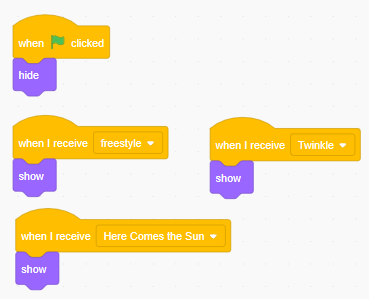
This ensures that when the green flag is pressed, the only thing on screen is the menu and then when an option is selected, the piano appears.
When a certain sprite is clicked and a signal is broadcast, each of those signals trigger a background change:

Here is a screenshot of the falling sprites for D:

Both of these are written within the same sprite however will only start if they receive a specific broadcasted message (see the first blocks of each code).
 Music Teaching 101