Using the original template we already had, I edited the pre-existing sprite costumes to look like the following:
Using the original template we already had, I edited the pre-existing sprite costumes to look like the following:

I later renamed each costume according to one of the notes in the song “Here Comes the Sun” (B, A, G, F#, E, D, C).
To make the falling sprites align with the piano keys, I changed the x coordinates in the code.
To portray the rhythm through the distance between each falling sprite. I told the sprites how long to wait before the next sprite fell. A quaver = 0.5 seconds, a crotchet = 1 second, a minum = 2 sec, semibreve = 4 sec. I even had a dotted quaver (0.75 sec) and a semiquaver (0.25).


I edited each of the sprites for the piano keys so that it would be clear when the key should be pressed when the falling sprites align with a circle.

In the pre-existing project that I began with, there was already coding to make the clones disappear once they reached the bottom of the screen. I edited the y coordinate in this code so that the falling sprites would disappear as soon as they aligned with the circles on the piano keys : y = -130.

After doing this I realised that the F# would prove to be a problem as the circles for the black notes were higher, therefore needed to be deleted at a higher y coordinate. I decided to create an entirely new sprite rather than create a costume for the F#. This way I could easily program that sprite to delete itself once it reached the appropriate y coordinate.
To emphasise when the falling sprites would align with a black key, I decided to change the colour of the falling sprites and the circles on the keys so that they matched. Yellow for white keys and green for black.

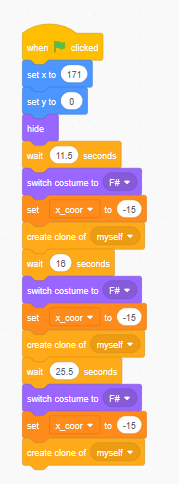
Since I created a new sprite for F#, I had to compensate for that in the coding which portrayed the rhythm. When an F# was played, the other sprites were told to “wait” the length in the notated rhythm + the length of the following F#. Likewise, the F# had to “wait” the length of all of the notes preceding it. You can see the waiting time between each F# in the screenshot below:
 Music Teaching 101